Collection Point
Overview
A Collection Point is the actual managed collection target — a host or a device — and the source of all collection data. Whether it was auto-onboarded by a Collection Rule or manually created by you, it ultimately appears in this list. Each collection point records "what to collect, how to connect, who collects, and which configuration is applied," and all of these settings are managed centrally on the Details Page.
Key Features
- Unified onboarding view: Both auto-onboarded and manually created collection points converge here
- Agent-based load distribution: Each collection point can specify which agent collects from it
- Template reuse: After associating a Collection Template, the template's configuration syncs automatically
- Tags + Macros: Use tags for grouping and filtering; use macros for parameter differentiation
- Enable/disable: Pause a collection point without deleting its configuration
List Page
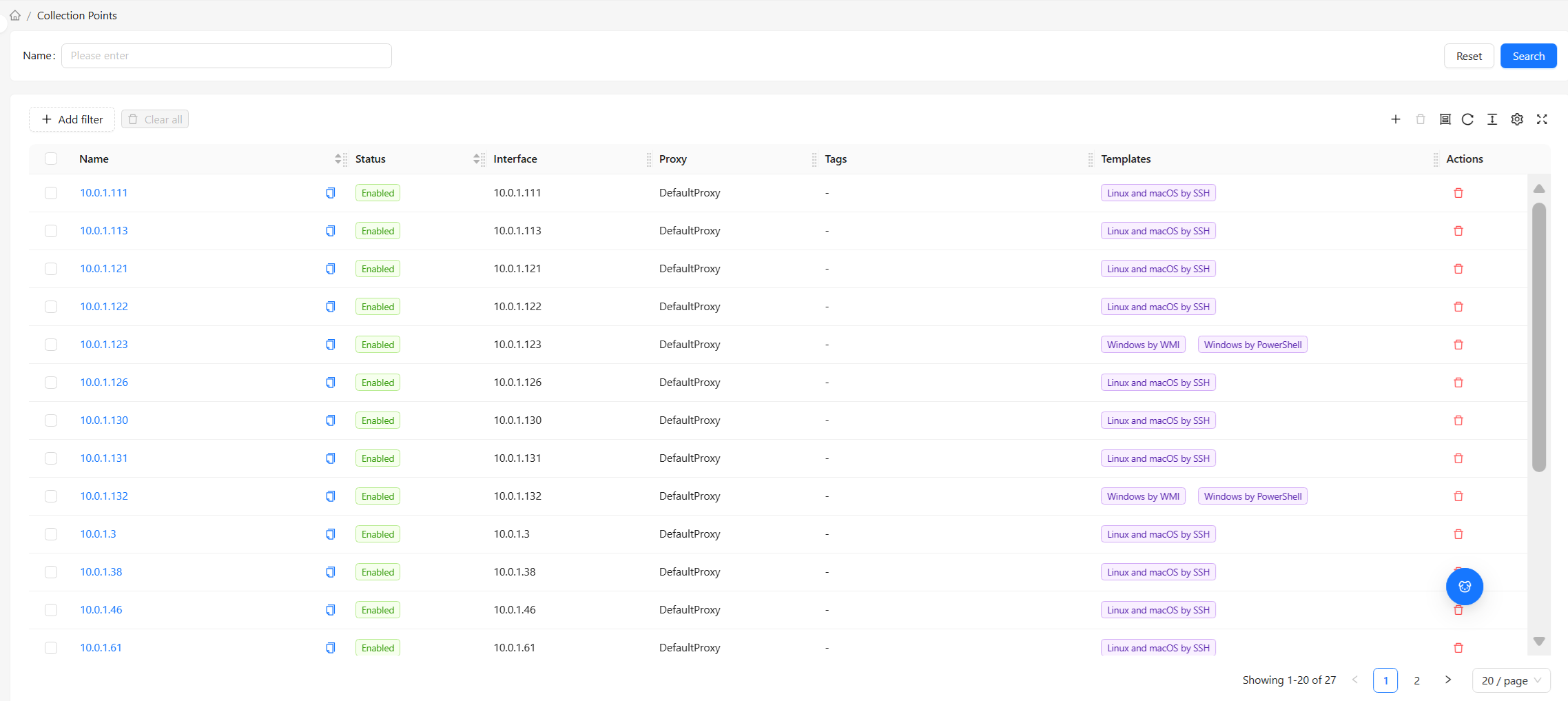
Default Columns
| Column | Description |
|---|---|
| Name | The collection point's display name. Click to enter Details |
| Status | Enabled (collecting) / Disabled (paused) |
| Interface | The primary connection address (IP or DNS) — the path the platform/agent uses to access it |
| Agent | The agent responsible for collecting from this point; if unspecified, the platform connects directly |
| Tags | Applied tags (key-value pairs). A preview of the first few is shown in the list, with a count for the rest |
| Template | The associated collection template |
For common table operations such as column management, filtering, pagination, and density, see Common Data Table Operations. Column preferences are saved independently per view.
Filters
Three types of filtering are supported:
| Filter | Use Case |
|---|---|
| Search | Fuzzy search for a collection point by name |
| Status | View only enabled / only disabled collection points |
| Availability | View only reachable / only unreachable collection points |
For example, to find "disabled devices that may have been overlooked for enablement," filter the status to "Disabled" and review them one by one.
Top Bar Actions
- New: Manually create a collection point (see Collection Point Details — Create)
- Bulk Delete: Select multiple rows and delete them at once
- Refresh: Reload the list
Collection points in the list come from two main sources: (1) created by Collection Rules during auto-discovery; (2) manually created by you here. In day-to-day operations, the vast majority of collection points come from auto-onboarding. Manual creation is typically used for a small number of special devices or for testing.
Status vs. Availability
Two easily confused concepts:
| Concept | Meaning |
|---|---|
| Status (Enabled / Disabled) | A switch you control — disabling is like "pausing collection." The configuration is preserved and can be re-enabled at any time |
| Availability (Reachable / Unreachable) | The result of system probing — even if enabled, a device with network issues will show as unreachable |
In other words: "enabled" is about "whether you want to collect," and "reachable" is about "whether collection is possible." An enabled but unreachable collection point usually indicates a network or device problem that needs investigation.
Next Step: Details Page
The list page is for browsing and bulk operations. To view or modify the full configuration of an individual collection point (basic info, tags, macros, various discovery rules), go to:
The details page is organized as multiple sections + tabs: Overview, Tags, Macros, plus CI Discovery Rules and Collection Point Discovery Rules.